Why Minutes Matter: Responding Fast When Your Systems Fail
Most outage time is spent before anyone starts fixing. How to detect failures before customers do, get the right person moving, keep users informed and learn from every incident.
By the PageChck engineering team · · 7 min read
Every system fails sometimes: a deploy goes wrong, a certificate expires, a DNS record is changed by mistake, a cloud region has a bad afternoon. You can’t prevent every failure. What you can control is how long it lasts — and that is mostly decided by how fast you respond.
Downtime is expensive. In ITIC’s 2024 survey, over 90% of mid-size and large enterprises said a single hour of downtime costs them more than $300,000. Smaller companies lose less in absolute terms, but they feel it just as much: lost sales, support tickets, refunds and customers who quietly try a competitor.
Where the time goes
An outage is not one block of time. It is a chain of steps, and each one can be fast or slow:
- Detect — someone (or something) notices that it’s broken.
- Alert — the right person finds out.
- Acknowledge — that person takes ownership, so others know it’s being handled.
- Mitigate — roll back, fail over or restart, so users are served again.
- Learn — understand the cause and prevent the repeat.
Teams tend to invest in the fourth step — better rollbacks, faster deploys — while the first two quietly eat most of the outage. A fix that takes ten minutes doesn’t help much if nobody noticed the problem for an hour. And when the first report comes from a customer email or a social media post, the damage to trust is already done.
1. Detect failures before your customers do
Internal metrics and logs are essential, but they can only report what your systems see. If DNS is broken, the TLS certificate has expired or the load balancer is rejecting connections, requests never reach your application — and its dashboards look perfectly calm.
External checks close that gap. Request your public URLs from outside your infrastructure on a schedule, the same way a user would, and treat a wrong status code, a timeout or a connection error as down. A few rules make them reliable:
- Check often enough. The check interval is the worst case for detection. A check every 5 minutes means you know within 5 minutes; a check every hour means customers will often know first.
- Check what users use. The home page, the login, the API your mobile app calls, the checkout — not just a
/healthendpoint that always says OK. - Watch slow failures too. Certificates and domains expire on a date you can see coming weeks in advance. There is no excuse for being surprised by them.
2. Alert the right people, without the noise
An alert is only useful if it reaches someone who can act and if they believe it. Two things destroy that: alerts that go to a channel nobody reads, and alerts that cry wolf. After a few false alarms at 3 a.m., people start muting notifications — and the real one gets missed.
- Confirm before alerting. Retry a failed check once before declaring an outage. A single dropped connection shouldn’t wake anybody.
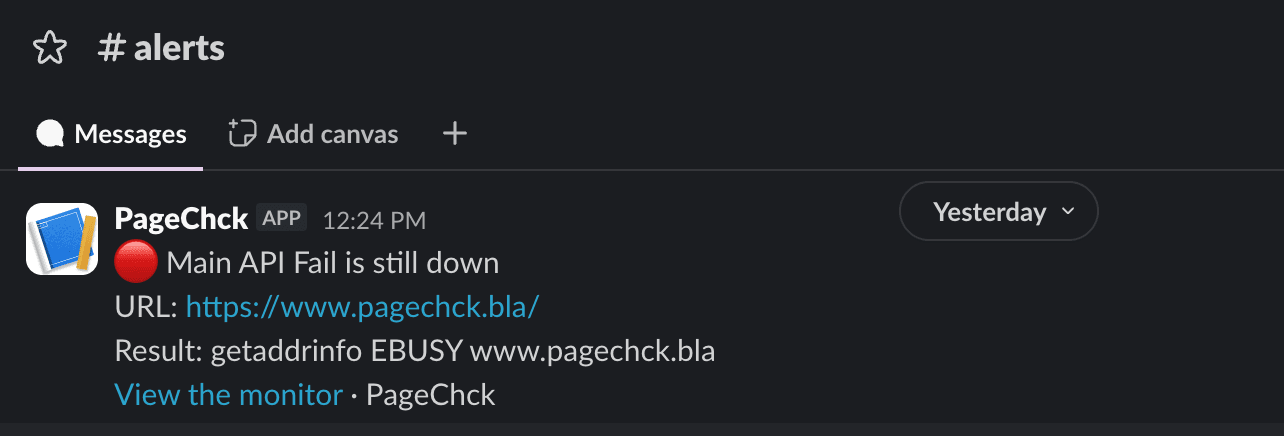
- Send alerts where people already are — the team’s Slack channel, the on-call engineer’s email, or your incident tool through a webhook.
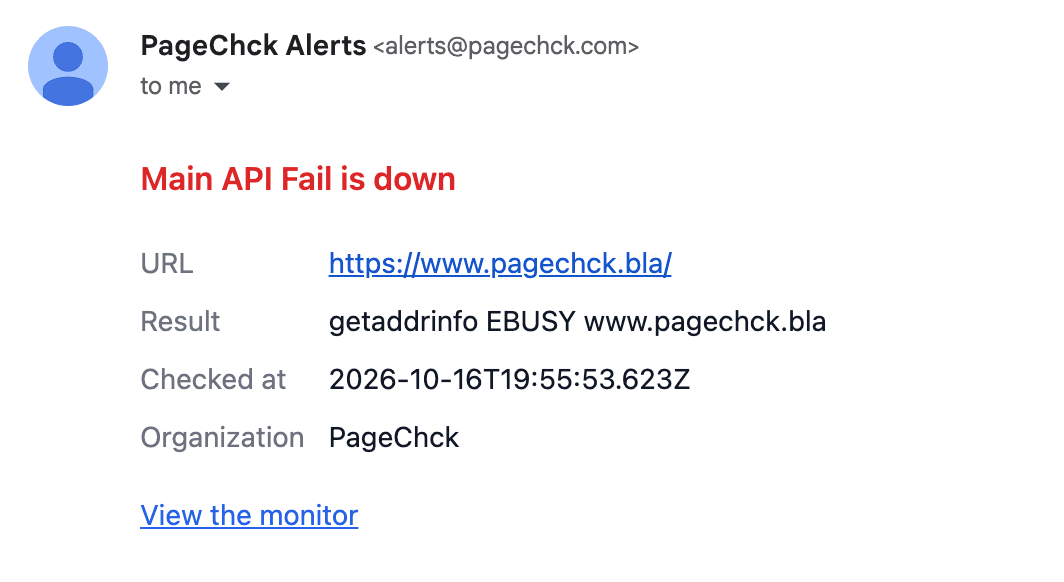
- Make alerts actionable. Say what is down, the exact error and when it started, and link to the details. “Something is wrong” is not an alert.
- Mute planned work. Maintenance windows keep expected downtime from training people to ignore alerts.
3. Make ownership visible
The most dangerous moment in an incident is when everyone has seen the alert and everyone assumes someone else is handling it. Acknowledging an incident solves that: one person says “I’m on it”, and the rest of the team can stand down.
Until someone acknowledges, the alert should keep coming back. A reminder every 15 minutes or every hour — depending on how critical the service is — makes it hard for an outage to fall through the cracks during a busy day or a weekend.
4. Mitigate first, investigate later
When users are affected, the goal is to restore service, not to understand everything. Roll back the last deploy, fail over to the replica, scale up, or turn off the feature flag. The root cause will still be there in an hour, and you’ll find it faster when the pressure is off.
This only works if mitigation is prepared in advance: one-command rollbacks, runbooks linked from alerts, and people who have practiced. Our post on recovering faster with observability goes deeper into this part.
5. Keep your users informed
Silence during an outage feels like neglect. A public status page tells customers you know about the problem and you’re working on it, which cuts the flood of “is it down?” tickets and lets your support team focus. Afterwards, a short note on what happened shows you take reliability seriously — and 90 days of uptime history shows how rare incidents are.
6. Learn from every incident
Once the service is back, write down what happened while it’s fresh: when it started, when it was detected, when it was fixed and why. Measure the gaps between those times. If detection took longer than mitigation, your next investment is in monitoring, not in faster deploys. Keep the review blameless and end it with one or two concrete follow-ups.
A simple alternative: PageChck
You don’t need a large observability platform or a set of homegrown cron scripts to cover the first steps of that chain. PageChck is uptime monitoring built around fast response:
- HTTP checks of your sites and APIs every 5 minutes, with failures confirmed by a second attempt.
- Alerts in Slack, by email or as signed webhooks, with the exact error and a link to the details.
- Reminders until someone acknowledges the incident, and a note with the downtime when it recovers.
- TLS certificate expiry warnings 30, 14 and 7 days ahead.
- Maintenance windows that mute alerts during planned work.
- A public status page with 90-day uptime and incident notes for your customers.
It takes a couple of minutes to set up: sign up with Google or GitHub, add the URLs that matter and choose where alerts go.
The takeaway
Fast response is not about heroics. It’s a chain of small, prepared steps: checks that catch failures early, alerts people trust, clear ownership, a practiced rollback and honest communication. Shorten the slowest link first — for most teams, that’s still detection.
If you’d like help with the rest of the chain, see our observability and monitoring service.